How to Listen to Music Together Online
Why Listen to Music Together Online?
Sharing music over text barely works. You send a link, your friend gets to it three hours later, and the moment's already cold. The point of sharing a song is the reacting: catching the same drop at the same second, then fighting about whether the bridge beats the chorus while it's still playing.
That used to mean being in one room. qsync drops the room requirement. Everyone opens the same link and playback stays locked across every browser, wherever people actually are.
Building a Shared Playlist
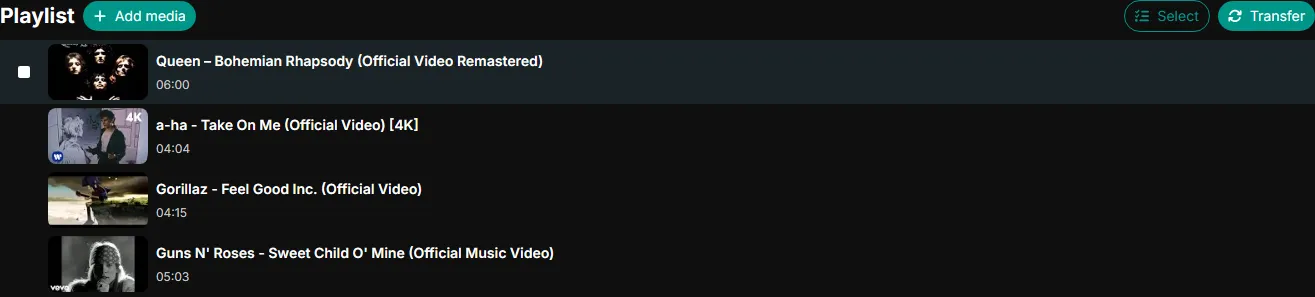
On qsync you create a channel and start pasting URLs. Music videos, audio on a direct link, a full concert recording, each one lands in the queue in order.
The queue is drag-and-drop. Shuffle tracks around, cut the ones that aren't landing, slot new ones in mid-session. It plays top to bottom and loops at the end, so a playlist runs for hours without anyone reaching for it. A channel holds up to 250 tracks, which is more than most sessions will ever fill.
For music that auto-advance is the whole thing. Nobody wants to stop after every song to paste the next link. Load it, hit play, forget it's there.
Staying in Sync
Every listener is on the same second of the same track. Show up late and you drop straight into the current spot. The channel manager's pause stops every player at once; a skip moves the whole room to the next song.
Transitions carry no gap either. One song ends and the next is already going, with the playback offset handed off cleanly, so the queue plays like one continuous mix instead of a stack of clips loading one at a time.
Where the Music Comes From
Most sessions live on YouTube, since its catalog of music videos, lyric videos, and fan uploads dwarfs everything else. The queue doesn't stop there, though. A Rumble upload, a Kick VOD of a live DJ set, a Twitch stream, a direct audio file, all fair game.
It all rides the same queue, and listeners won't clock the handoff. A music video can run straight into a Rumble upload and the seam feels like any other track change.
Chat While You Listen
Live chat runs next to the player on every channel. Shout out a timestamp, drop a sticker, take a side on the lyrics. The chat holds its spot beside the player on desktop and mobile alike, so nobody's tab-hopping.
Music sessions pull more chat than video does. With less to watch on screen, people talk more, and the thread fills up fast, especially when everyone's adding tracks and voting on them with reactions.
What People Use It For
The patterns repeat once you've hosted a few. A new album lands and the group listens straight through, the chat turning into a live track-by-track review. A lo-fi mix runs in the background while everyone co-works to the same soundtrack. Somebody opens a discovery round and the queue fills with picks nobody else would have found. The table breaks down how each one tends to run.
| Use case | How it runs | Why the queue helps |
|---|---|---|
| Album listen-through | Queue every track in order and play start to finish | Everyone stays on the same song, so the chat review has no spoilers |
| Lo-fi co-working | Queue a few hours of ambient tracks and let it loop | Runs untouched in the background while people work |
| Music discovery | Everyone takes turns adding picks to the queue | Builds a collaborative mixtape nobody would assemble alone |
| Live DJ sets | Drop a Kick or Twitch DJ stream into the channel | The whole group watches the set with synced audio and chat |
Getting Started
Spin up a channel, paste your first track, send the link. Nothing to download, no extension, no account to listen, and it runs the same on desktop or a phone.
Whoever made the channel holds playback; everyone else rides along. Fill the queue, pull in your people, and hit play.